How to Price-Check a Rust Skin Across Marketplaces
A step-by-step way to price any Rust skin using Steam's ask and bid, third-party listings, listing depth, freshness and fees, worked through with live data.
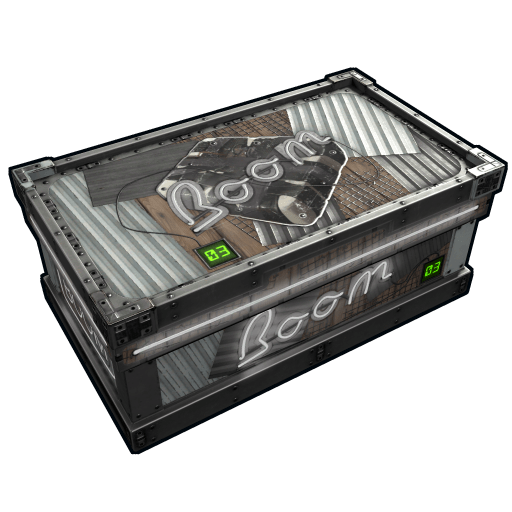
"What's this skin worth?" sounds like it should have one answer. In practice a Rust skin has several prices at once: what Steam sellers are asking, what Steam buyers will pay, what third-party sellers want, and what you'd actually receive after fees. A good price check gathers those numbers and turns them into a range. This guide walks through the method with one real skin, the Neon Boom Storage, using data from October 14, 2026.
Step 1: Get Steam's three numbers
Start on Steam, because it's the reference most people quote. You want three figures.
- The ask: the lowest current listing. For the Neon Boom Storage, $35.92, with 46 listings.
- The bid: the highest open buy order. $29.84, with 808 orders in total.
- Recent sales: Steam's price overview showed 5 sales in the past 24 hours, at a median of $34.94.
The ask is the price you'd pay to buy one right now. The bid is what you'd get if you sold instantly. Recent sales show where trades actually happened. A quoted "Steam price" usually means the ask, which is the most flattering of the three.
Step 2: Collect third-party listings, with their depth
Next, look at what the same skin costs elsewhere. Here are the third-party listings for the Neon Boom Storage that had stock on October 14, 2026, sorted by price.
| Marketplace | Lowest listing | Listings |
|---|---|---|
| SkinSwap | $24.50 | 21 |
| Lisskins | $24.99 | 39 |
| Skin.Land | $25.01 | 39 |
| CS.Deals | $25.55 | 25 |
| RustSkins (rustskins.com) | $25.64 | 2 |
| DMarket | $26.18 | 7 |
| Waxpeer | $26.24 | 13 |
| Skinport | $26.48 | 32 |
| RapidSkins | $28.99 | 22 |
The count matters as much as the price. Four sites each had 20 or more copies listed between $24.50 and $26.48. That's a real market, not a single lucky listing. A price backed by one or two listings can vanish before you click, so give it less weight.
Step 3: Check freshness
Prices go stale. Before trusting a number, check when it was last updated. Marketplaces that sync every few minutes are more reliable than ones last refreshed days ago. In this example, every listing in the table above was updated on October 14. If one source is noticeably cheaper and also out of date, assume the listing is gone.
Step 4: Decide whether you're buying or selling
The same data gives different answers depending on which side you're on.
If you're buying
Your price is the cheapest listing with enough depth that you can actually get it, then that site's buyer fees, if any. For the Neon Boom Storage, that's about $24.50 to $26.50 on third-party sites, or $35.92 on Steam if you're paying from your Steam Wallet.
If you're selling
Your price is what lands in your account after fees.
- On Steam at the ask: listing at $35.92 pays $31.24 into your Steam Wallet after the roughly 15% fee.
- On Steam, instantly: filling the top buy order at $29.84 pays $25.96.
- Elsewhere: buy orders on third-party sites give you an instant-sale floor. On October 14, DMarket's best buy order was $24.63, with 133 orders behind it. For a listing, subtract the site's seller fee from your price. Fees are on each site's profile in the marketplace directory.
Selling on Steam pays in wallet credit. Third-party sites may pay in cash or crypto, depending on the site. Decide which you want before comparing the numbers.
Step 5: Read the shape of the market
With the numbers lined up, look at the pattern.
- Gap between Steam's ask and bid. Here it's $35.92 against $29.84, about 17%, a little wider than average for a liquid skin. A gap far beyond 15% to 20% means the ask is optimistic.
- Gap between Steam and third-party. The cheapest deep third-party listing, $24.50, is about 32% below Steam's ask. That's normal for Rust. It reflects wallet credit being worth less than cash.
- Trend. On rustskins.gg's history, the skin's daily average Steam price was $34.13 on September 14 and $34.53 on October 13. That's flat over a month, so recent prices aren't being driven by a short spike.
Step 6: Write down a range, not a number
Put it together and the Neon Boom Storage on October 14, 2026 looks like this:
- Cash market: about $24.50 to $26.50, with healthy depth.
- Steam market: recent sales near $35, an ask of $35.92 and an instant-sale bid of $29.84.
That range is the honest answer to "what's it worth." If someone offers $40 in a private trade, it's generous. If someone values your copy at $20, they're low. Either way, you now know why.
Common mistakes
- Quoting the Steam ask as value. It's the top of the range, and only what you'd get before fees.
- Trusting thin listings. One listing at a great price is often a bait or a typo. Always check the count.
- Ignoring bot-site spreads. Trade-bot exchanges set their own prices for items they take in and items they sell, so a high "value" on one side doesn't mean they'll pay it.
- Forgetting the hold. A skin bought on Steam can't be resold until the date on the item, so a quick flip can't happen right away.
- Mixing currencies. Make sure every price you compare is in the same currency.
Doing it faster
All of this can be done by hand across a dozen tabs, but it doesn't need to be. Rustskins.gg item pages list Steam and third-party prices together with listing counts and update times. The price comparison tool compares prices across marketplaces for many skins at once. The deals page flags listings priced well below the Steam reference.